


Search words and phrases
Search includes titles, personal notes, captions, source addresses, filenames, tags, and saved articles. It also includes document contents and recognized image text.
PDF search uses selectable text. Scanned page images and video audio are not searchable.
Every word must match the item, but words can appear in different fields. Search ignores letter case.
For example, recipe dinner can match recipe in a title and dinner in a note.
Result excerpts label the matching source, such as File contents, My note, Saved article, or Image text. Matching words have highlights.
Best match ranks title matches above source address matches.
- Enter words in the library search box.
- For an exact phrase, use double quotes, such as "garden plan".
- To rank matches, select Best match in the sort menu.
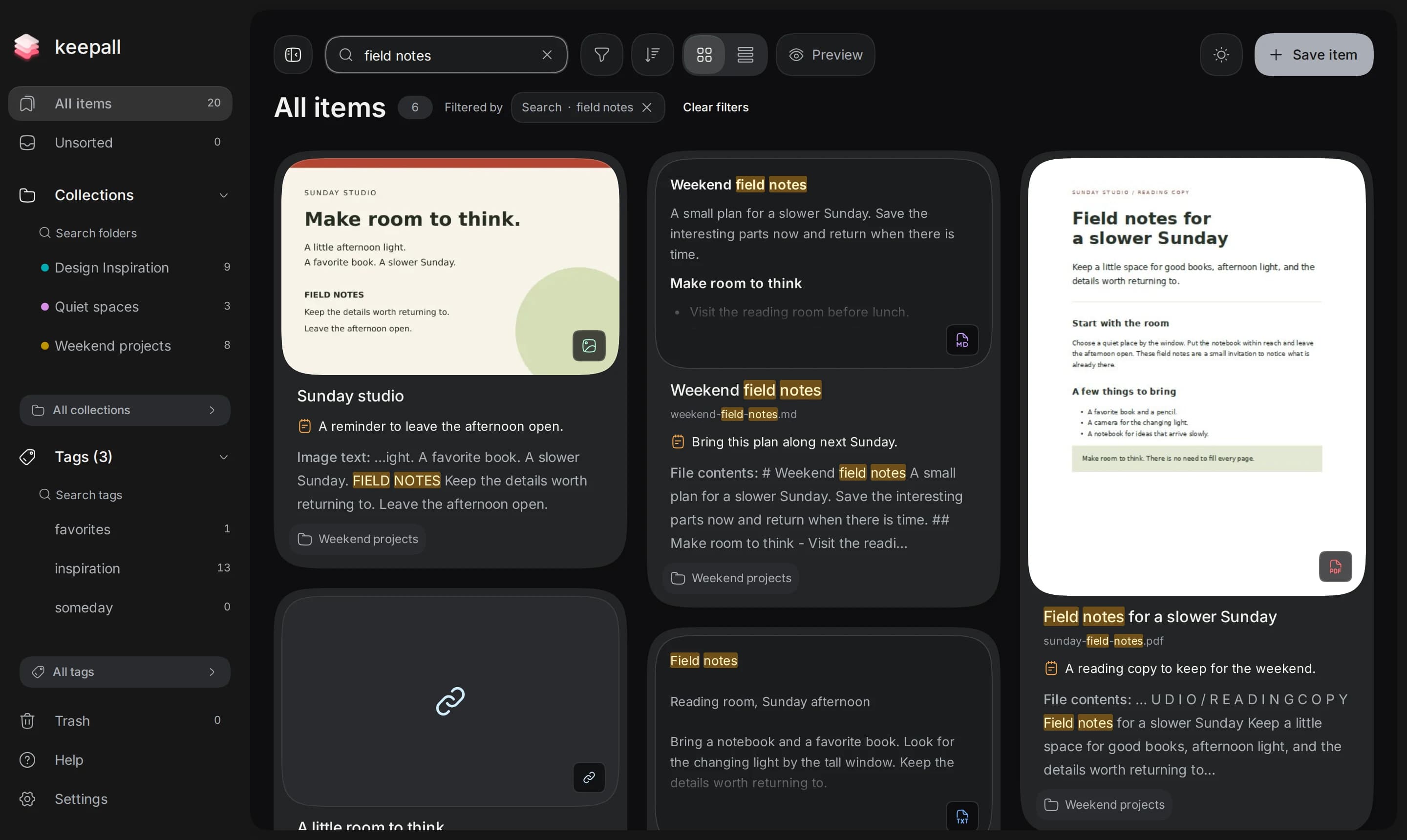
Check the search location
Search stays within the current collection, tag, and item-type filters. Clear filters removes the query, type, and tag filters. It keeps the current collection, Unsorted, Trash, or overview.
Search entire library keeps the query and removes collection, Unsorted, tag, and type limits. It is unavailable in Trash and the collection or tag overviews.
All collections and All tags search names. Opening a collection or tag allows item search inside it. Trash has separate search and normal results exclude it.
Pinned items stay first inside a collection. Clearing a Best match search returns the sort order to newest first.
- If results are missing, check the current collection, tag, and item type.
- To include other collections or tags, select Search entire library when available.
Search images by color
Color search matches only images with an extracted palette. Unknown color names return no results.
color: is the only query operator. OR, exclusions, and type: syntax are unsupported. All query terms must match the item.
- If an image has no palette, select Extract palette in its menu.
- Enter color:red to search a color family.
- For similar shades of a hex color, enter color:#FF0000.
- To narrow the results, add words, such as color:red receipt.
Search file contents
Keepall reads saved documents locally during search. Large files and libraries can take longer. Search includes text beyond shortened reading previews.
Scanned PDFs need a selectable text layer to match. Keepall does not recognize text in PDF page images.
- If some file text could not be searched, select Retry search.
- For screenshot text, select Read text on the saved image.
- Check the recognized text.
- Search words from the checked result.